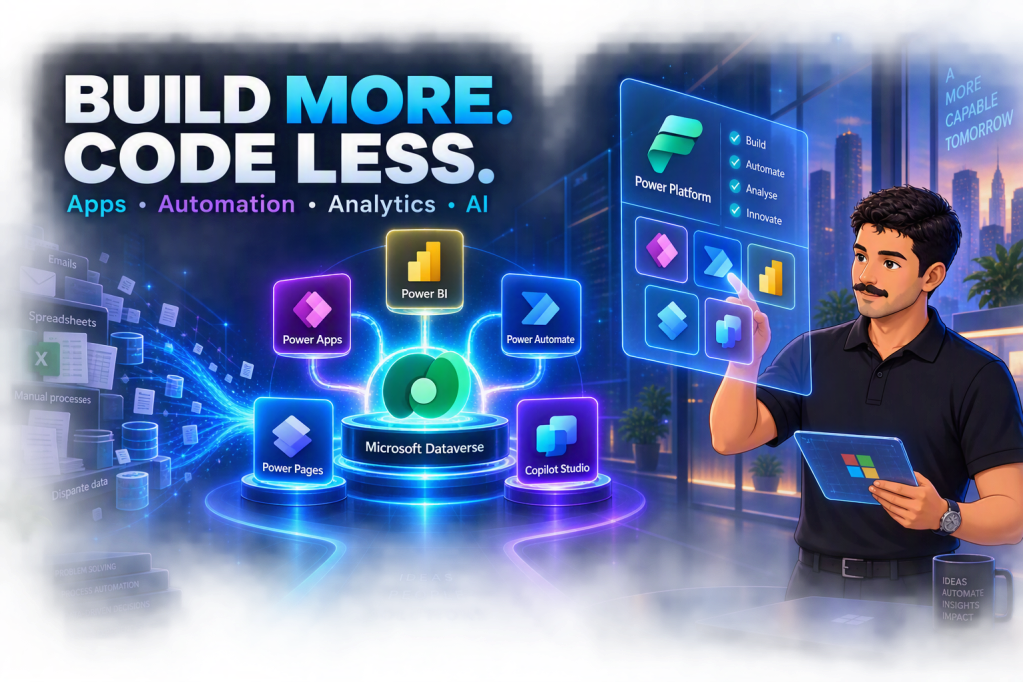
Power Platform puts the power to build apps, automate work, and analyse data directly in the hands of the people who understand the business — no coding required.
What is Microsoft Power Platform?
Microsoft Power Platform is a family of no-code and low-code tools that lets organisations build solutions faster, automate repetitive work, and turn data into decisions — without waiting for a developer.
At its core sits Microsoft Dataverse, a secure and scalable data platform shared across all five tools. This means an app built in Power Apps can read the same data a Power Automate flow writes, which a Power BI dashboard then visualises — all connected, all consistent, with no manual data syncing.
Power Platform also includes built-in governance through environments, Data Loss Prevention (DLP) policies, and admin centres — giving IT the control they need while business teams move fast.
The five tools explained
Power Apps — Build custom applications
Power Apps lets anyone create professional web and mobile applications without writing code. Choose between canvas apps (full design control, drag-and-drop layout) or model-driven apps (automatically generated UI built on your Dataverse data). Both connect to over 400 data sources including SharePoint, Excel, SQL, and external APIs.
Real example: A manufacturing company replaced paper-based quality inspection forms with a Power Apps canvas app. Field teams photograph defects on a tablet, data flows directly into Dataverse, and a supervisor receives an instant alert. Inspection time dropped by 40%.
Power Automate — Automate repetitive work
Power Automate turns manual, time-consuming tasks into automated workflows. Cloud flows trigger on events such as an email arriving, a form being submitted, or a schedule — and then carry out actions like sending notifications, updating records, or routing approvals. Desktop flows go further, automating legacy desktop applications using UI automation and screen recording, with no API needed.
Real example: A finance team automated their entire invoice approval process. A PDF email triggers automatic data extraction, routes the invoice through a Teams approval, and posts the result to their ERP system — zero manual steps, saving 15 hours per week.
Power BI — Turn data into decisions
Power BI transforms scattered data into clear, interactive dashboards and reports. Business users can build their own reports without IT, connect to dozens of data sources, and share insights securely across the organisation. Features like row-level security ensure people only see the data relevant to them, while scheduled refresh keeps dashboards always up to date.
Real example: A retail chain replaced weekly Excel report packs with a Power BI dashboard that refreshes every hour. Regional managers now self-serve the numbers they need — the weekly reporting meeting was cancelled entirely, saving each manager three hours per week.
Power Pages — Build external portals
Power Pages makes it easy to create secure, professional websites and portals for customers, partners, or communities — without a web developer. It connects natively to Dataverse, supports external authentication through Azure AD B2C, and includes a visual design studio for building multi-step forms, content pages, and self-service experiences.
Real example: A local government agency replaced a PDF-based grant application process with a Power Pages portal. Applicants log in, complete a guided multi-step form, upload documents, and track their application status — without emailing staff. Processing time halved.
Copilot Studio — Create AI-powered agents
Copilot Studio (formerly Power Virtual Agents) lets you build intelligent conversational agents that can answer questions, guide users through processes, and trigger automated actions — without AI expertise. Agents can connect to SharePoint knowledge bases for open-ended Q&A, integrate with Power Automate to take real actions, and be deployed to Microsoft Teams, websites, or mobile apps.
Real example: A financial services firm deployed a Copilot Studio agent on their internal Teams channel. It searches their SharePoint policy library to answer employee questions, escalates complex cases to human agents, and logs every interaction in Dataverse. First-contact resolution rose by 35%.
Why organisations adopt Power Platform
The business case for Power Platform is built on four outcomes that organisations consistently report:
- Faster delivery — Low-code development reduces app creation time by up to 50% compared to traditional coding, compressing delivery timelines from months to weeks.
- Empowered teams — Business users in HR, finance, operations, and other functions can build and iterate on their own solutions without depending on IT backlogs.
- Reduced costs and errors — Automating manual steps eliminates the mistakes that come from copy-pasting, email chains, and competing spreadsheet versions.
- Better decisions — Power BI brings scattered data into a single, trusted view, so leaders can spot trends and act quickly rather than waiting for the next report.
Deutsche Bahn is one of many organisations that demonstrate this at scale — empowering thousands of citizen developers who built hundreds of production applications, saving dozens of days per year on specific operational processes.
Who is Power Platform for?
Power Platform is designed for two audiences working together:
- Citizen developers — business users who understand their processes deeply and can now build solutions themselves using no-code tools, without any programming background.
- Professional developers — developers who can extend Power Platform with custom code, connectors, and integrations when more complex requirements arise, using the same platform their colleagues already work on.
This combination — business expertise meeting technical capability on a shared platform — is what makes Power Platform particularly powerful for organisations looking to move quickly without sacrificing quality or governance.
Getting started: a practical approach
The most effective way to start with Power Platform is to focus on one tool and one well-defined business problem, then build from there.
- Identify your biggest pain point. Is it a manual process that consumes hours each week? A missing app that forces teams to use spreadsheets? A reporting gap that slows decision-making?
- Match the tool to the problem. Manual tasks → Power Automate. Missing apps → Power Apps. Reporting gaps → Power BI. External portals → Power Pages. Repetitive enquiries → Copilot Studio.
- Start with the PL-900 learning path to get a solid understanding of the full platform, then go deep on your chosen tool.
- Build one complete solution, measure the impact, and use those results to expand the platform further across your organisation.
“Power Platform puts professional-grade tools in the hands of the people who know the business best. No code required — just a clear problem and the curiosity to solve it.”
Where to learn without getting overwhelmed
You don’t need to learn everything at once. Start with the Power Platform Fundamentals (PL‑900) learning path to understand the big picture without going too deep into every tool. Then, specialise by browsing the official Power Platform training hub and filtering for your chosen component.
Use these resources to go deeper on your chosen component without getting pulled into everything at once.
- Power Platform Fundamentals (PL‑900)
https://learn.microsoft.com/en-us/training/paths/pl-900-power-platform-fundamentals/ - All Power Platform Training (browse by component)
https://learn.microsoft.com/en-us/training/powerplatform/